
Introduction
Email has become an integral part of our daily lives, personally and professionally. From sending quick notes to colleagues to keeping in touch with friends and family across the globe, email makes communication faster, easier, and more efficient. However, if you’re new to email or want to understand it more deeply, you’re in the right place! In this article, we’ll dive into ” What is an email? here’s everything you need to know to get started “. Let’s explore how this simple yet powerful tool can transform your communication and productivity.
What Is an Email? A Simple Explanation of Electronic Communication
Email, or electronic mail, is a method for sending digital messages through the Internet. Unlike traditional mail, where you send physical letters, email allows you to instantly send a message across the globe. Whether it’s a simple “hello” to a friend or a complex business proposal, email is the backbone of digital communication.
You can think of email as a digital version of a letter. Instead of writing on paper and mailing it via a post office, you type your message on a computer, smartphone, or another device and send it via the internet. It’s a much quicker process and doesn’t require stamps or physical delivery. What is an email? It’s the modern way to communicate—efficient, cost-effective, and accessible anytime, anywhere.
The Key Components of an Email: What You Need to Know
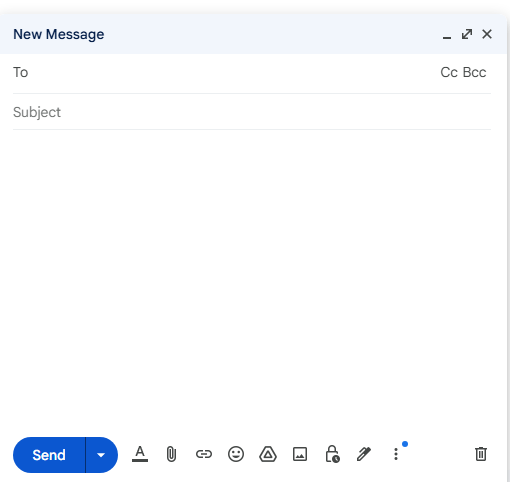
Understanding the components of an email will help you communicate more clearly and effectively. Every email contains a few essential parts that come together to make sure your message reaches its destination. Here’s a breakdown of the key elements:
- Subject Line—This is a critical part of your email, as it’s the first thing the recipient sees. It should be clear and concise, providing a snapshot of what the email is about. A compelling subject line ensures that your email gets opened rather than ignored.
- Recipient Fields (To/From/CC/BCC)—These fields define who is sending and receiving the email. The “To” field lists the primary recipient(s), while “From” shows who is sending the message. “CC” stands for carbon copy, allowing you to send the email to additional recipients. “BCC” (Blind Carbon Copy) sends an email to others without them seeing who else received it.
- Salutation— While this isn’t strictly necessary, it’s customary to include a greeting at the beginning of your email. This sets a professional or friendly tone, depending on the nature of the email.
- Body—This is the heart of your email. Here is where you write your message, ask questions, or provide information. The body is where the content of your email lives, and it’s essential to keep it clear and to the point.
- Signature—At the end of an email, you can include a signature with your name, position, contact details, and any other relevant information. This adds a professional touch and makes it easier for the recipient to reach you if needed.
Understanding these components will help you craft effective emails that are easy to read and understand, whether you’re communicating for business or personal purposes.
How Does an Email Work? Understanding the Process Behind the Scenes
You may have wondered how your message travels across the internet to reach someone else in a split second. While it seems like a magical process, it’s quite straightforward. Here’s a step-by-step explanation of how an email is sent and received:
- Writing the Email – First, you compose your email in an email client (like Gmail, Outlook, or Apple Mail). Once you’ve written your message and attached any files, you click “Send.
- SMTP Server – Your email doesn’t go directly to the recipient. Instead, it first travels to a server using SMTP (Simple Mail Transfer Protocol). This server helps route the email to its proper destination.
- Email Server Processing—Once your email reaches the recipient’s email server, it is stored and processed. Depending on the protocol used (IMAP or POP3), the email will be retrieved and in the recipient’s inbox.
- Inbox Arrival—Finally, the email appears in the recipient’s inbox, where it can be opened, read, and acted upon. This happens almost instantaneously, and the process remains the same whether you’re sending an email to someone across the street or across the world.
While the process is quick and seamless, it’s good to understand that several systems work together to ensure your email is delivered safely and efficiently.
Uses of Emails
Email is often seen as just a quick way to send and receive messages, but in reality, it’s so much more. It’s a tool that facilitates organization, marketing, file sharing, and much more. Email has transformed how businesses operate and communicate with clients and customers.
One major aspect of email’s power is email marketing. Businesses use email to build relationships with their customers by sending them updates, promotions, and personalized content. It’s an affordable way to reach a wide audience while keeping communication direct and personal. By analyzing customer behavior and engagement, companies can fine-tune their email marketing strategies for better results.
On a personal level, email is used for a range of purposes: applying for jobs, communicating with service providers, and receiving important updates or invoices. Whether it’s for personal or business purposes, an email truly matters because it’s a reliable, structured tool that facilitates not only conversation but also action and organization.
What Is an Email Used For?
Email isn’t just for quick notes or casual chats; it’s an essential tool in both your personal and professional life. Let’s look at some of the most common uses for email:
- Personal Communication—While social media has made it easier to stay connected, email remains a reliable tool for keeping in touch with family and friends. You can share updates, send attachments, and have longer, more thoughtful conversations.
- Professional Communication—In the professional world, email is indispensable. From job applications and resumes to client inquiries and team collaboration, email is used for all types of business communication. It helps maintain a record of conversations and ensures that important information doesn’t get lost.
- Email Marketing – For businesses, email is one of the most effective ways to engage with customers and clients. By sending targeted messages, businesses can build loyalty, announce new products, and encourage sales. Email marketing is personal, measurable, and cost-effective.
- Receiving Updates— Many services, including banks, online stores, and utilities, use email to send important updates, bills, and account information. It’s also the primary way many people receive newsletters and updates on topics they care about.
Email is a dynamic tool with endless possibilities. Whether you’re communicating with friends, coordinating work projects, or running an entire marketing campaign, what is an email is far more than just sending a message—it’s about facilitating connection and driving action.
Conclusion
Email is far more than just a means of sending messages—it’s an essential tool for communication in today’s world. From connecting with friends to advancing your career, email is a versatile and reliable way to stay in touch and get things done. Now that you understand the basics of what an email is and how it works, you’re ready to start crafting meaningful emails that can help you succeed both personally and professionally. So go ahead, dive into the world of email, and start sending your messages with confidence!
We hope you enjoyed this post What Is an Email? Here’s Everything You Need to Know to Get Started. Please share, leave a comment, or click here to learn more.




One thought on “What Is an Email? Here’s Everything You Need to Know to Get Started”